What is DNS and How to Update DNS Information?
20.08.2026
If your domain is registered with Atak Domain, you don't need a separate marketplace to sell your domain name. Open the domain in your customer panel, set a fixed price or the lowest offer you'd accept, and a free “domain for sale” page goes live on the domain itself. The summary below covers fees, the optional broker service and how to hand the domain over safely.
Key takeaways
Contents

Three things: whether the domain is registered with Atak Domain, whether its expiry date and ownership details are in order, and whether it carries any trademark risk. Finding a problem after you've listed can derail a deal that was almost done.
The sale feature only works for domains registered with Atak Domain. If yours is with another registrar, you'll need to transfer it to Atak Domain first. .tr domains aren't supported at the moment.
Transferring before you decide to sell has a few advantages:
To transfer, unlock the domain at your current registrar and get its EPP (authorization) code. According to Atak Domain's transfer page, at least 60 days must have passed since registration and at least one month must remain before expiry; transfers usually take 5 to 7 days. Country-code extensions may have extra requirements. You don't want a buyer waiting on a transfer, so move the domain before you list it.
Not what you paid for it, but what a buyer could do with it. According to Verisign's Domain Name Industry Brief, there were 401.6 million registered domain names worldwide at the end of Q2 2026. Buyers aren't looking for just any domain in that crowd; they want a name that works for them. These questions will help you justify a price:
Comparable sales matter most. Look in sales databases such as NameBio for recently sold domains with a similar length, structure and extension. The million-dollar deals that make the news are outliers and tell you nothing about an ordinary domain. Treat automated appraisal tools as a rough starting point, not a price.
The domain and figures below are made up to illustrate the method; they aren't real market data. Say you own brewstop.com: two words, 9 letters, a .com with an obvious industry.
Then pick how you'll sell:
You can change either setting later in your sale settings.
Everything happens in the customer panel and takes a few minutes. The screenshots below show the Turkish interface; the steps are the same.
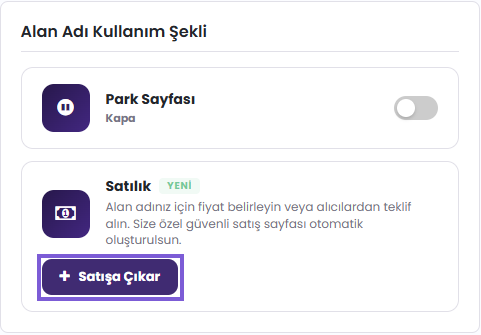
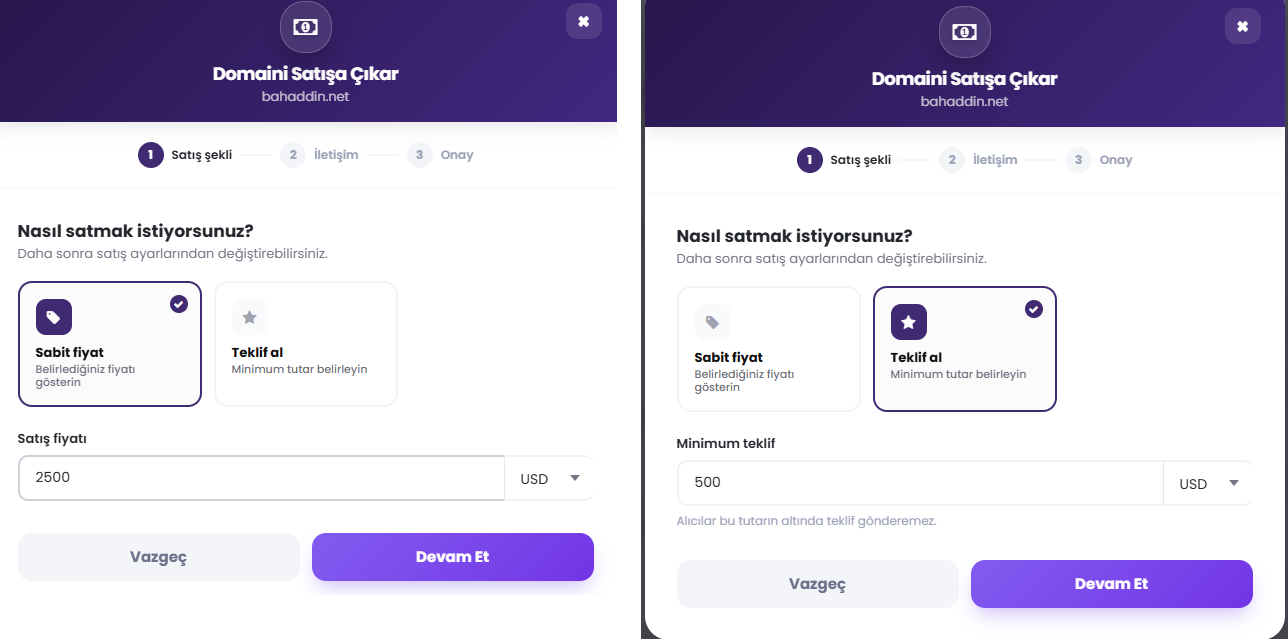
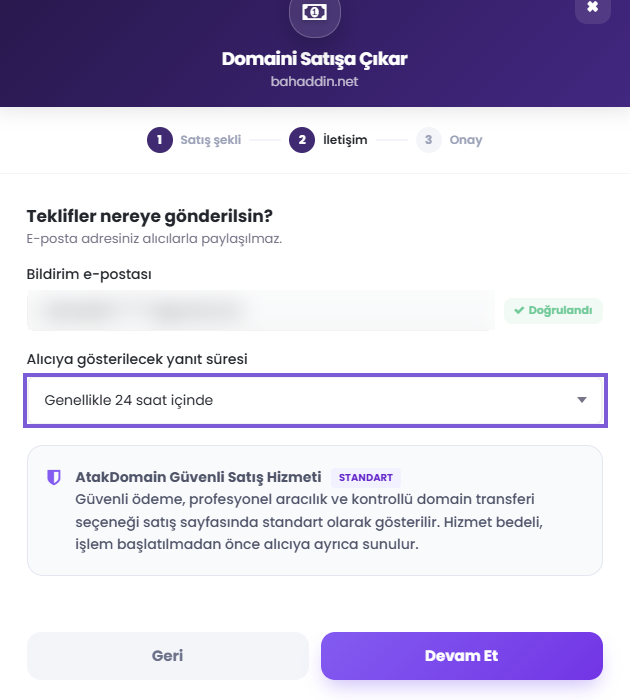
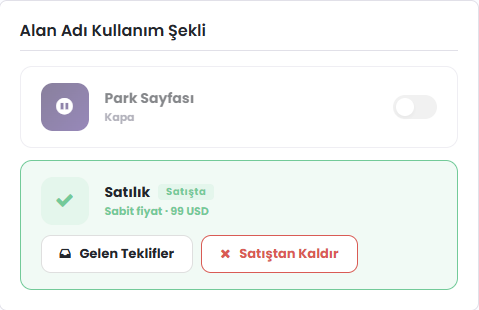
Domain ready? You can list it now: Go to the customer panel
As soon as you finish listing, a for-sale page goes live at your domain's address. You don't pay for it, design it or build a website. Anyone who types your domain into a browser sees it.
The page shows that the domain is for sale, the price or offer option, and a way for the buyer to get in touch. It notes that the listing is tied to an Atak Domain account, but your contact details stay hidden. Buyers who want payment protection also see the broker option by default.
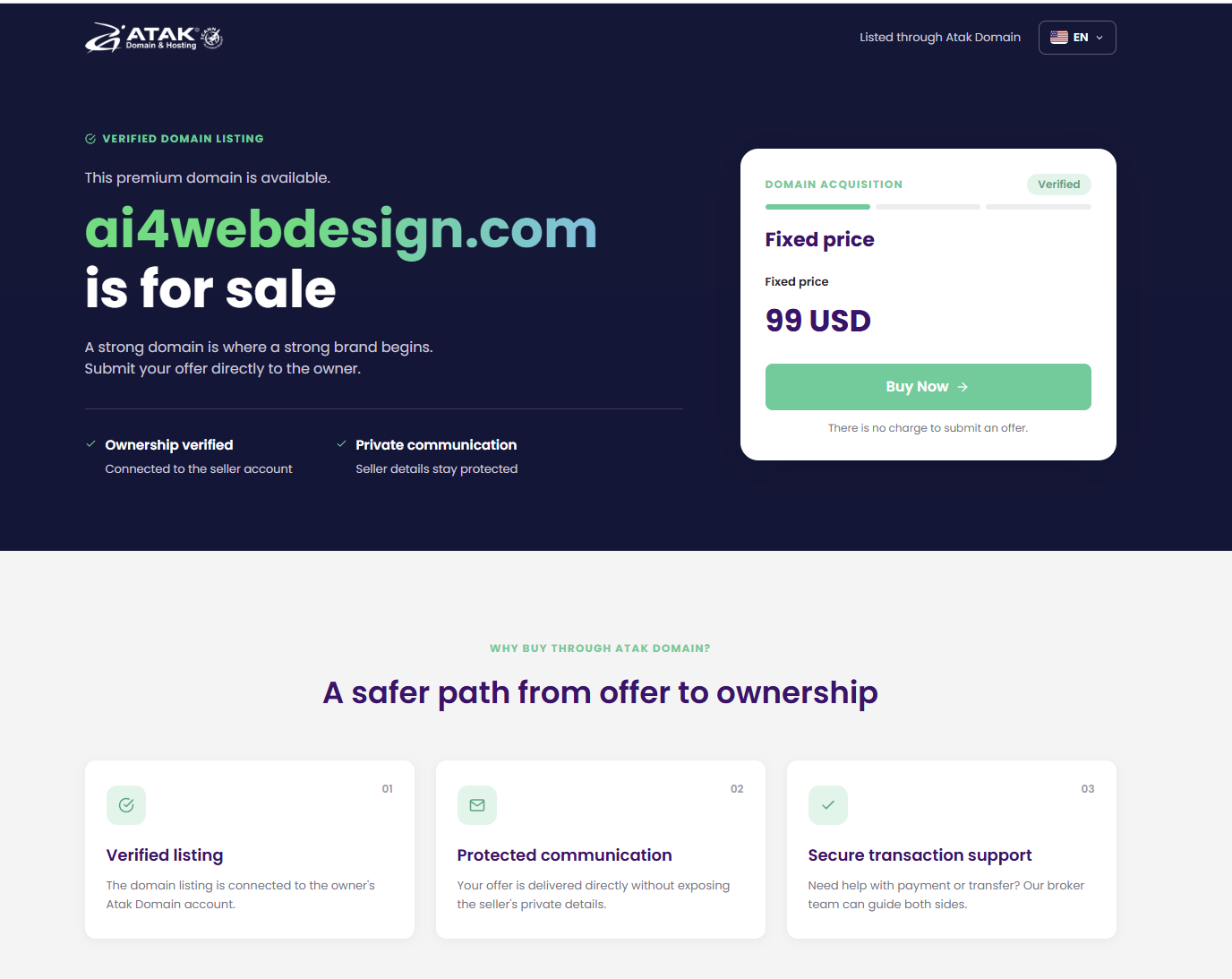
When a buyer clicks the buy button or sends an offer, you get an email. No payment is taken automatically at this point; the price, payment and handover are settled between you and the buyer. In other words, a live page doesn't mean the domain is sold. It just makes it easier for buyers to find you. When you remove the listing, the page comes down immediately.
Putting the page up and waiting often isn't enough. A few habits improve your chances:
Not on a direct sale. Atak Domain offers two separate routes: a direct sale through the free for-sale page, and the optional, paid Domain Broker service. You don't need a broker to use the for-sale page.
| Direct sale | Domain Broker (optional) | |
|---|---|---|
| Who runs the process? | Buyer and seller. They agree on price, payment and handover between themselves. | Atak Domain's broker team handles negotiation, payment and handover together. |
| Who starts it? | The seller lists the domain; the buyer sends a request or offer from the page. | The buyer, from the Domain Broker page. |
| Payment protection | None. The buyer pays the seller directly. | Yes. The sale price isn't released to the seller until the domain is under the buyer's control. |
| Seller pays | Nothing | Nothing |
| Buyer pays | The sale price only | $69.90 upfront (non-refundable) + 10% of the final price if the deal closes |
For comparison, many marketplaces take a cut of the sale price. Afternic charges 15% to 30% on Buy it Now sales and Spaceship SellerHub charges 10% (as of September 25, 2026). On a $2,000 sale, that leaves the seller with $1,400 to $1,800. With a direct sale on Atak Domain, you keep the full $2,000; your bank's or payment provider's own fees are separate.
The broker's 10% isn't deducted from the seller's share. It's what the buyer pays for brokerage and payment protection, and only if the deal goes through. If there's no deal, the buyer pays just the upfront fee. Details are on the Domain Broker page.
The most common first-timer mistake is treating a sale as one action. It's actually four:
A short email thread is enough. It should cover the price and currency, how and to whom payment is made, which Atak Domain account the domain goes to, rough dates and who covers transaction fees. If a website, logo or social media accounts are part of the deal, list them one by one. If you've quoted traffic or revenue figures, back them up with a report.
In a direct sale, Atak Domain doesn't handle the payment; the two parties decide the order. If the seller transfers first, they may never get paid. If the buyer pays first, they may never get the domain. As a seller, your rule is simple: don't transfer until you see the money in your own account.
That rule doesn't protect the buyer. If you pay a seller who then doesn't transfer the domain, Atak Domain can't refund a direct payment that was never made to it; you'd have to resolve it with the seller, through legal channels if necessary. If you don't know the seller or can't afford to lose the money, start the purchase through Domain Broker instead. There, the sale price isn't released to the seller until the domain is under your control.
The handover is a move from one Atak Domain account to another in the customer panel, so the buyer needs an Atak Domain account. The steps are explained in this help article.
If the buyer later wants to move the domain to another registrar, extra rules may apply. For extensions such as .com and .net, ICANN's Transfer Policy blocks a transfer to another registrar within 60 days of registration or a previous registrar transfer. A change of registrant also triggers a 60-day transfer lock, though registrars may let the registrant opt out in advance. Country-code extensions have their own rules, so don't promise the buyer a firm date.
Almost every attempt relies on the same two things: urgency and fake proof.
The choice usually depends less on the domain's value and more on how well the two sides know each other. If you're on the buying side, our guide to buying a domain name covers the basics.
| Situation | Best route |
|---|---|
| You're selling a domain you bought years ago and never used, at a fair price, and agreeing by email is fine with you. | Direct sale. The page is free and there's no commission. |
| Someone you don't know has made a higher offer than you expected. | Suggest the broker to the buyer. It costs you nothing, and the payment is protected. |
| You want to buy a domain for your brand and don't know the seller. | Broker. The sale price isn't released until the domain is yours. |
| You want to control the price and the process entirely yourself. | Direct sale. |
No. Listing from the panel and the for-sale page are both free.
Not on a direct sale. Atak Domain charges no commission to the buyer or the seller. Your bank's transaction fees are separate.
Transfer it to Atak Domain first; once the transfer completes, you can list it from the panel. .tr domains can't be listed for now.
Usually not at a fair price. Some investors and marketplaces offer quick buyouts, but typically at a fraction of what an end user would pay. Listing takes minutes; finding the right buyer can take weeks or months.
No. Requests go to your verified email address, which is never shared with buyers.
No. The page helps buyers find you. A sale is complete only after the agreement, payment and transfer.
There's no set timeline. A well-priced domain with real demand can find a buyer within weeks; a niche or expensive one may wait for months.
No, it's optional. You don't need a broker to use the for-sale page.
The buyer: $69.90 upfront, plus 10% of the final price if the deal closes. If there's no deal, only the upfront fee is paid. The seller pays nothing.
Atak Domain can't refund a direct payment that was never made to it; you'll need to resolve it with the seller. That's why buyers should use the broker with sellers they don't know.
Wherever your likely buyers will see it. If your domain is with Atak Domain, the free for-sale page lets you sell with no commission. Large marketplaces offer more exposure but typically take 10% to 30% of the sale. You can use both, as long as your price is the same everywhere.
Click Remove from sale on the For sale card; the for-sale page comes down immediately.
Selling a domain comes down to four things: get the domain ready, set a realistic price, put the deal in writing and don't transfer before you're paid. On Atak Domain, listing and the for-sale page are free, and a direct sale carries no commission for anyone. Buyers who want payment protection can always use the broker service.
Domain registered elsewhere? Transfer it to Atak Domain first. Buying and want payment protection? See the Domain Broker service.